
 Sergey Dimitrov
  12.12.2025
 If you’ve ever tried selling online, getting paid from abroad, or just sending money safely, you’ve probably asked yourself one big question: how to open a PayPal account in UAE without running into the usual limits or confusing steps. The good news? PayPal does work in the UAE — for residents, freelancers, online sellers, small business owners, and even people who just want a secure way to shop globally.
But the process isn’t always obvious. You need to know which details matter, how verification works, which cards and banks actually link smoothly, and what fees you’ll face as a UAE user. This guide tells you everything you need to know in simple English, so you can easily set up a PayPal account in the UAE, make sure it's real, and use it with confidence for both personal and business transactions.
What Is PayPal and How Does It Work in the UAE?
At its simplest, PayPal is a digital wallet that sits between you and your money. You link a card or bank once, and after that you pay or get paid using just your email and password instead of typing card details all over the internet. That’s why so many people like using PayPal in UAE for online shopping, subscriptions, or getting paid from abroad — it keeps your card number out of random websites.
For UAE users, the basics are the same as anywhere else: you create a PayPal account UAE, verify your email and identity, add a card or bank, and then you’re able to send and receive money. You can get paid by clients in other countries, withdraw money to particular UAE cards or accounts, and pay on most worldwide sites that take PayPal.
There are a few local quirks — currency conversion, withdrawal options, and some limits on how funds move — but nothing unmanageable once someone explains it clearly. PayPal is like an "online layer" on top of your UAE bank account. It's safer to share, easier to use, and accepted almost everywhere.
Does PayPal Work in the UAE for Residents and Businesses?
Yes — PayPal absolutely works in the UAE, but it works a little differently compared to places like the US or UK. For regular users, PayPal is easy to use. You may shop online, sign up for services, send money, and get paid by clients in other countries. Most people in the UAE use it because it feels safer than giving out their card information everywhere and since so many websites around the world accept it.
For businesses, PayPal works too — you can open a business account, issue invoices, receive international payments, and connect PayPal to your e-commerce store. Many freelancers and small online shops in the UAE rely on it because they don’t want to jump straight into local merchant accounts or gateways. The one thing to know is that UAE withdrawals can be picky: PayPal only works smoothly with certain banks and cards, and transfers sometimes take a couple of days.
PayPal follows the same standards as other worldwide payment providers when it comes to digital payments in the UAE. As long as your details match and your identity is verified, PayPal works without drama. If you’re unsure which account type to choose or how to set it up correctly, Consulting.ae can help you figure out the cleanest option.
How to Open a PayPal Account in the UAE Step by Step
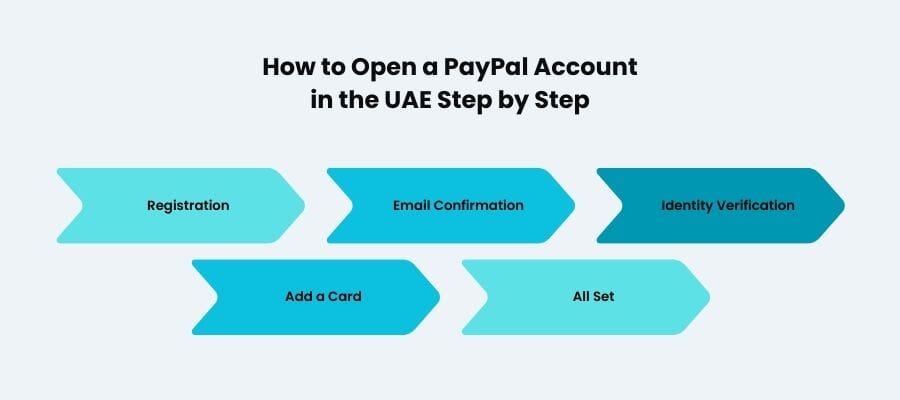
Opening a PayPal account from the UAE looks harder than it really is. The website or app will throw a lot of small steps at you, but underneath it all, the logic is simple: create an account, prove it’s really you, then connect a way to pay and get paid. If you know that in advance, the whole how to open a PayPal account in UAE process feels a lot less scary.
How to Make a PayPal Account in the UAE Using the App
If you like doing everything on your phone, you can learn how to make a PayPal account in the UAE straight from the app. Download it, tap “Sign Up,” and choose whether you want a Personal or Business account. Personal is fine for online shopping, small freelance payments, and day-to-day use. Business is better if you’re planning to invoice clients or connect PayPal to a website or store.
You’ll be asked for your email, a strong password, your UAE mobile number, and your real name exactly as it appears on your passport or Emirates ID. Then you add your address in the UAE. Once the basic profile is created, the app will nudge you to add a card — most people link a UAE debit or credit card at this stage so they can start paying and getting paid right away.
How to Verify Your Email and Identity
This is the step many people skip and then wonder why their PayPal account UAE feels “blocked.” First, open the email from PayPal and click the confirmation link. Until you do that, your account is half-awake.
Next comes identity verification. PayPal might ask for a copy of your passport or Emirates ID, a selfie check or proof of address. It’s not them being difficult; it’s just standard compliance. Until this is done, your limits stay low and withdrawals can be restricted.
Once your email, ID, and phone all line up, your PayPal in UAE account behaves like a normal, fully usable account. If you’d rather have someone walk you through it — or you’re not sure whether to open personal or business — Consulting.ae can sit on your side of the table and guide you step by step.

Want to learn more about UAE business setup services?
How to Link a Bank Account or Card to PayPal in the UAE
When you link a card or bank account to your PayPal account, it becomes helpful. Your profile is there, but you can't truly pay, be paid, or take anything out until then. The good news is that UAE users can link most major debit and credit cards directly, and the process takes less than a minute. This step is essential for anyone asking how to open a PayPal account in the UAE or how to make a PayPal account in the UAE and actually use it without limits.
In the app, go to Wallet → Link a Card or Bank. Most people in the UAE start by linking a card, because it’s instant: you enter your card number, expiry date, CVV, and billing address (the same one connected to that card). PayPal may place a tiny temporary charge — usually a few dirhams — to confirm the card is real. It disappears automatically.
Linking a UAE bank account is more specific. PayPal only supports withdrawals to certain banks and certain types of accounts, so your bank must appear in PayPal’s supported list inside the Wallet section. If it’s available, you’ll add your IBAN and wait for PayPal to send one or two small verification deposits. Enter those amounts in the app, and your bank is fully linked.
Once your card or bank is connected, your PayPal account becomes fully functional: you can receive money, withdraw funds, shop online, or handle freelance payments without issues. If you’re unsure which UAE bank works best with PayPal, Consulting.ae can help you choose the smoothest option.
PayPal UAE Fees: What You Need to Know
PayPal is convenient, but it’s not free — and understanding the fees upfront helps you avoid surprises. The way PayPal charges UAE users depends on what you’re doing: paying, getting paid, withdrawing, or converting currency. None of the fees are hidden, but they are easy to misunderstand if you’re new to the platform.
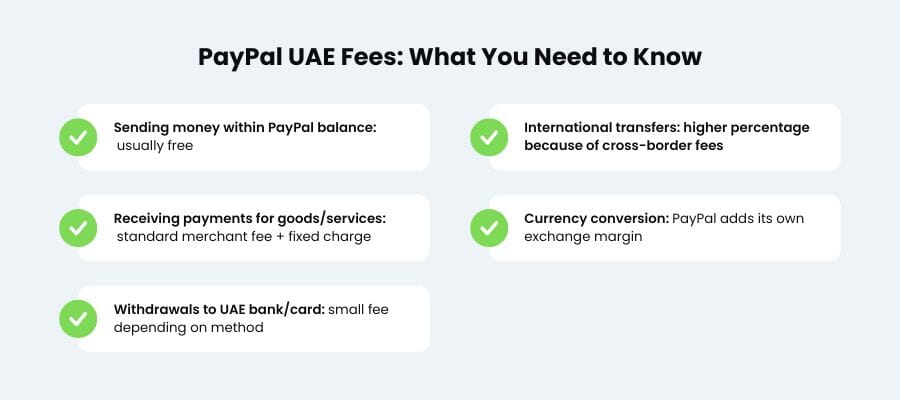
Here’s the simple breakdown most UAE users rely on:
- Sending money within PayPal balance: usually free
- Receiving payments for goods/services: standard merchant fee + fixed charge
- International transfers: higher percentage because of cross-border fees
- Currency conversion: PayPal adds its own exchange margin
- Withdrawals to UAE bank/card: small fee depending on method
The merchant fee is the most important fee for freelancers and anyone who sells things online. PayPal takes a tiny flat fee for each transaction, plus a portion of each payment you get. When you withdraw money from PayPal, it may also change the amount from USD or EUR to AED. This is something that many people neglect to think about.
If you're unsure which fees apply to your specific use case, Consulting.ae can help you break it down before you start accepting payments. The official PayPal Help Centre always has a full list of fees, but it's still helpful to see what those numbers mean in real life.
PayPal Currency Conversion and UAE-Specific Limitations
Currency conversion is one of those things UAE users don’t notice until money starts disappearing in small pieces. PayPal doesn’t hide its rates, but the platform uses its own exchange margin instead of the mid-market rate you’d see on Google. Thus, if someone pays you in USD or EUR, your AED withdrawal will be little smaller than intended. It’s not a mistake — it’s PayPal’s built-in conversion spread.
If you hold balances in multiple currencies, PayPal may auto-convert them depending on how you withdraw or what payment method you’re using. Many UAE freelancers keep their balances in USD as long as possible to avoid unnecessary conversions, then convert only when withdrawing. It’s not a rule — just a common habit to reduce fees.
There are also a few UAE-specific limitations worth knowing. Some UAE banks don't allow direct PayPal withdrawals, and some cards only accept payments. UAE banks scrutinise overseas inflows more closely, therefore some transfer types may take longer to process.
None of this is a deal-breaker, but it does mean PayPal behaves a little differently in the UAE than it might in your home country. If you want someone to help you choose the right card or bank to avoid these headaches, Consulting.ae can point you toward the smoothest options.
Tips for Sending and Receiving Money Safely in the UAE
Using PayPal in the UAE is generally safe, but a few habits can make your experience much smoother — especially if you run an online business or receive payments from abroad. Think of these tips as your “don’t learn the hard way” checklist.
Here are the most practical safety steps:
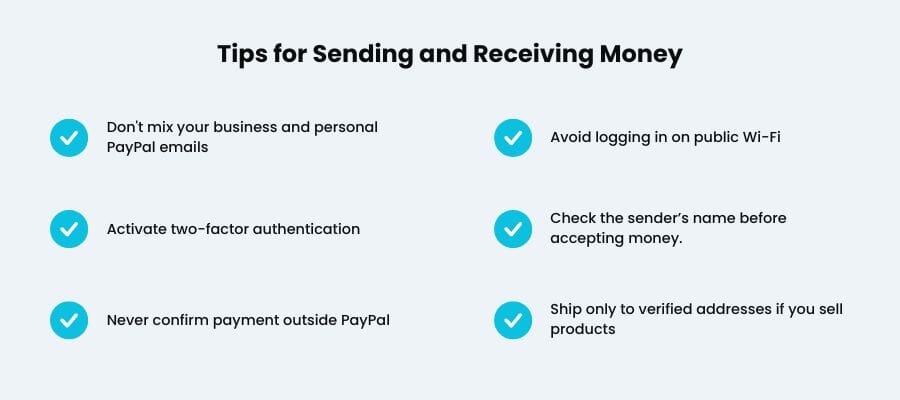
- Don't mix your business and personal PayPal emails. It keeps your transactions clear and makes it easier to keep track of disagreements.
- Activate two-factor authentication. A few seconds of extra login time is worth it when your account holds client payments.
- Never confirm payment outside PayPal. Real payments generate real PayPal notifications — screenshots sent by strangers don’t count.
- Avoid logging in on public Wi-Fi. Even in malls or airports, unsecured networks can expose your details.
- Check the sender’s name before accepting money. Scammers often use similar-but-not-quite names to trick you.
- Ship only to verified addresses if you sell products. It adds an extra layer of protection in PayPal’s dispute system.
- Keep screenshots of transactions linked to contracts or invoices. UAE banks sometimes ask for proof when reviewing incoming international transfers.
Most problems happen when people are in a rush. Slow down for one minute, double-check the details, and you’ll avoid 99% of payment headaches. If you want help setting up safer workflows for your PayPal account in the UAE, Consulting.ae can walk you through best practices.
Conclusion
Once you understand how to open a PayPal account in the UAE, the whole system becomes far less intimidating. You know what to expect, how to link your bank, and how to move money without surprises. PayPal in UAE isn’t perfect, but it’s convenient, fast, and perfectly workable for freelancers, small businesses, and anyone earning online. If you ever get stuck — with setup, withdrawals, or verification — Consulting.ae can step in and guide you through it.
Is PayPal available for UAE residents?
Yes, PayPal is available for UAE residents and it works fine for everyday things like online shopping, subscriptions, and getting paid from abroad. There are a few local quirks, which is why people keep googling how to open a PayPal account in UAE, but you don’t need anything special — just a proper signup, verification, and a working card or bank.
Linking is simple in theory: add your card or bank details, wait for the tiny verification charge, confirm the code, and you’re good. Don't worry if the first attempt fails—some UAE banks block international authorisations. Changing debit or credit cards usually fixes it.
Fees vary depending on what you’re doing — receiving payments, sending money abroad, or converting currency. The part that surprises people most is the currency conversion markup, so always look at the number PayPal shows before you hit “send.”


